


Frequently Bought Together


Bundle Price

Key Features
- • Reliable HDMI to DVI digital video connection
- • 5M cable length for versatile placement
- • Supports high-definition signal transfer
- • Durable construction for long-lasting performance
- • Plug-and-play design with no drivers needed
- • Compatible with PCs, laptops, monitors, projectors, and HDTVs
- • Professional black color for a sleek appearance
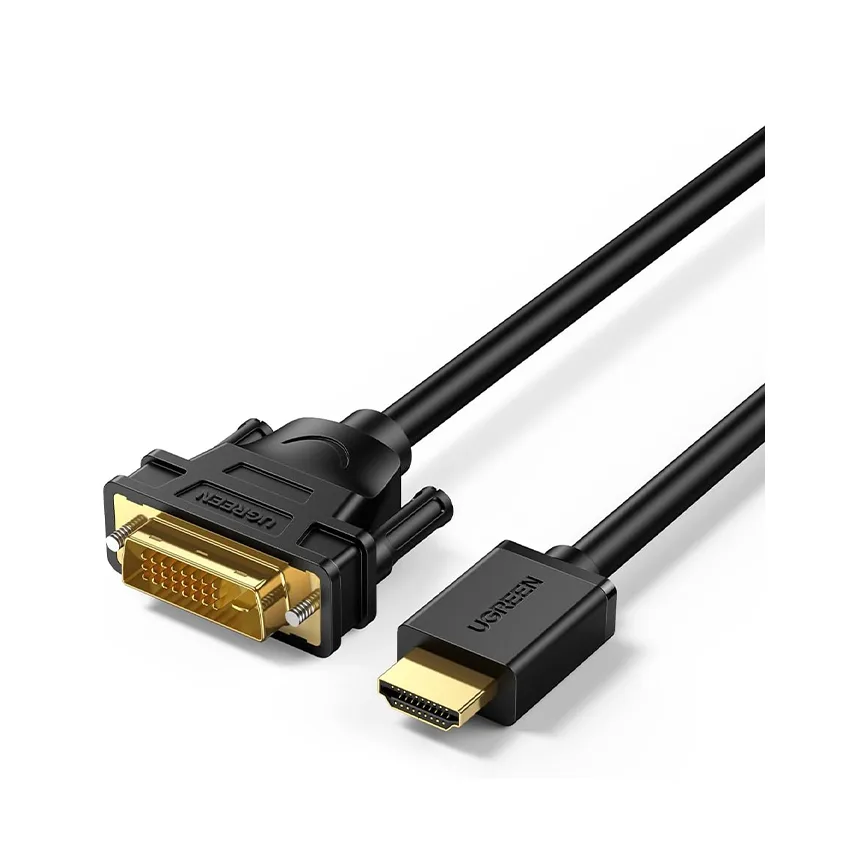
UGREEN HDMI TO DVI CABLE 5M BLACK 10137
The UGREEN HDMI TO DVI CABLE is designed to deliver superior digital video quality, making it an essential accessory for your home or office setup. With a generous 5-meter length, this cable provides flexibility in placement, allowing you to connect HDMI-equipped devices to DVI displays effortlessly.
Enjoy sharp image quality and reduced interference, ensuring smooth and clear viewing experiences whether you're gaming, working, or watching movies. The durable black jacket not only enhances the cable's longevity but also adds a professional touch to your setup.
- Reliable HDMI to DVI digital video connection
- 5M cable length for versatile placement
- Supports high-definition signal transfer
- Durable construction for long-lasting performance
- Plug-and-play design with no drivers needed
- Compatible with PCs, laptops, monitors, projectors, and HDTVs
- Professional black color for a sleek appearance
 HD106 HDMI to DVI-D cable, 5m. Exact 5m passive cable with HDMI male and DVI-D 24+1 male connectors.
01 · Product introduction
Overview
UGREEN HD106 10137 HDMI to DVI-D Cable, 5m, 1080p is documented for a specific connector pair, direction and ceiling. It should be selected by exact SKU and port geometry rather than by the broad words HDMI, DVI, DisplayPort or VGA.
Passive bidirectional digital wiring: HDMI source to DVI display or DVI source to HDMI display. One device must output and the other must input. Digital video only across the shared HDMI/DVI TMDS path. HDMI audio, ARC, Ethernet and CEC are not carried through the DVI endpoint. The source device, destination device, operating-system mode and any intermediate equipment must all agree before a picture can appear.
Gold-plated contacts, tinned-copper conductors, grounding, aluminium foil, braid shielding, flexible PVC jacket and moulded strain relief. These construction details support everyday reliability but do not create a mode, audio stream or conversion feature absent from the endpoints.
This guide deliberately separates physical fit, signal direction, performance ceiling and real-world usability so a buyer can reject a superficially similar but electrically different product.
Exact-SKU evidence reconciliation
All five exact live images are useful: connector identity, gold-plated contact/flexible cable detail, layered shielding, plug-and-play use and 1080p60. The 5m passive run is treated conservatively and tested before permanent routing. Primary UGREEN exact-product pages and the live Shopify gallery were reconciled before drafting; excluded artwork is recorded with the draft rather than silently repeated.
02 · At a glance
Key features
01
1920×1200 / 1080p60
UGREEN lists common modes through 1920×1200 and 1920×1080 at 60Hz; the complete chain determines the usable timing.
02
HDMI ↔ DVI-D 24+1
Identify which device is the source/output and which is the display/input. A cable or adapter cannot make two outputs talk to each other, and many display connectors are input-only.
03
Video only
Passive bidirectional digital wiring: HDMI source to DVI display or DVI source to HDMI display. One device must output and the other must input. Direction is a device-role rule, not merely an arrow printed on a cable.
04
5m
No product driver is installed for a passive cable. An active converter can still rely on the host graphics driver and supported output modes even when no separate app is required.
 Gold-plated contact and flexible PVC construction. The exact gallery highlights connector contact finish and bendable cable construction; it does not raise the digital mode ceiling.
03 · Physical fit
Connectors, direction and interface clarity
01
Connector / side A
Full-size HDMI Type-A male. It can be the source or display side when the connected device provides the required role.
02
Connector / side B
DVI-D 24+1 male with screw retainers. It carries digital video only and has no analogue VGA pins.
03
Signal direction
Passive bidirectional digital wiring: HDMI source to DVI display or DVI source to HDMI display. One device must output and the other must input.
04
Fit before force
Confirm full-size HDMI and DVI-D 24+1. A DVI-I socket can accept the digital plug when its device supports digital DVI, but analogue VGA is unavailable.
04 · Capability
Signal, data or power performance
UGREEN lists common modes through 1920×1200 and 1920×1080 at 60Hz; the complete chain determines the usable timing.
Digital video only across the shared HDMI/DVI TMDS path. HDMI audio, ARC, Ethernet and CEC are not carried through the DVI endpoint. A listed maximum is the ceiling of a correct complete chain, not a promise that every device exposes that mode.
The passive cable has no scaler, audio extractor, HDCP converter, repeater, capture chipset or graphics processor.
Because this is the longest variant in the batch, keep it away from mains bundles, avoid wall couplers where possible and verify the final timing before installation.
Real digital links can fail as a blank screen, sparkles, dropouts or colour errors; analogue VGA can additionally show softness or ghosting. Start at a conservative known-supported mode before increasing resolution or refresh rate.
 1080p at 60Hz Full HD ceiling. At 5m, test the requested mode before permanent routing and avoid unnecessary couplers or tight bends.
05 · Complete path
What the entire connection must support
Identify which device is the source/output and which is the display/input. A cable or adapter cannot make two outputs talk to each other, and many display connectors are input-only.
Match both physical connectors exactly. Confirm full-size HDMI and DVI-D 24+1. A DVI-I socket can accept the digital plug when its device supports digital DVI, but analogue VGA is unavailable.
For protected commercial video, HDCP support must exist at the source, display and every active device. A passive cable or connector adapter cannot add, remove or repair copy protection.
Test one direct path before adding a dock, KVM, wall plate, AV receiver, capture device, coupler or extender. Each added item can change EDID, timing, bandwidth or direction behaviour.
If a separate cable is required at a female socket, that cable becomes part of the signal budget. Its connector type, length and rating matter as much as this product.
 Tinned-copper conductors and multiple shielding. The cutaway shows grounding, foil, braid and PVC layers intended to support a stable digital-video path.
06 · Behaviour
Standards, negotiation and operating roles
Passive bidirectional digital wiring: HDMI source to DVI display or DVI source to HDMI display. One device must output and the other must input. Direction is a device-role rule, not merely an arrow printed on a cable.
The passive cable has no scaler, audio extractor, HDCP converter, repeater, capture chipset or graphics processor.
Mirror and extended-desktop layouts are created by the source computer and graphics system. One physical connection supplies one display path and does not create additional independent graphics outputs.
Resolution, refresh rate, colour depth, chroma, HDR, audio and protected-content behaviour are negotiated across the chain. A mode name on one device does not override the other endpoint.
The cable or adapter has no user firmware. The graphics driver, display EDID and operating-system settings select the final timing and can require updates even when the accessory itself is plug-and-play.
Ceiling, not a promise
Connector and standard labels describe capability. The complete source, destination, route, settings and negotiated mode determine the result.
07 · Device fit
Compatible devices and systems
01
HDMI computer to DVI monitor
A compatible HDMI output and digital DVI display input within the verified timing ceiling.
02
DVI computer to HDMI monitor
A digital DVI output and HDMI display input; route sound separately from the computer.
03
Game console or media player
Video can reach a DVI display if resolution and HDCP match; audio needs another output.
04
Projector
Digital DVI or HDMI endpoint with the opposite connector at the source and separate audio as required.
05
Not VGA
No passive adapter can extract analogue VGA from this DVI-D 24+1 digital-only cable.
08 · Practical value
Use scenarios
01
Legacy display reuse
Connect HDMI and DVI equipment over a direct 5m route without a separate adapter.
02
Office workstation
Run a DVI monitor from an HDMI-equipped desktop and choose mirror or extended desktop in software.
03
Presentation
Connect an HDMI laptop to a DVI projector while sending sound to the room audio system separately.
04
Home entertainment
Show compatible video from a console or player on a DVI display, subject to HDCP and timing support.
09 · Usability
Setup and usability guidance
- Power down the display or stop active output before working around fragile, tightly packed or screw-retained connectors.
- Inspect the source and display ports under good light. Confirm full-size HDMI and DVI-D 24+1. A DVI-I socket can accept the digital plug when its device supports digital DVI, but analogue VGA is unavailable.
- Align each plug with the socket and insert it straight using normal hand pressure. Stop immediately if the connector tilts, binds or requires force.
- Secure DVI or VGA screws finger-tight only, or fully seat the DisplayPort latch where present. Never use retention hardware to pull a plug into alignment.
- Select the correct display input, then begin with 1920×1080 at 60Hz or another documented safe mode before trying the product's maximum listed timing.
- Configure mirror or extended desktop on the source. Route audio separately whenever this product's signal description says video only.
- Support adapters and heavy cables so they do not lever a small HDMI, Micro HDMI or Mini DisplayPort socket; preserve a relaxed bend at every strain relief.
- To disconnect, release latches and screws first, hold the connector shell and pull straight. Do not twist, rock or pull on the cable jacket.
 Plug-and-play projector connection. Connect one valid digital output to one compatible input, select the display source and route audio separately.
10 · Host behaviour
Operating-system, driver and software guidance
No product driver is installed for a passive cable. An active converter can still rely on the host graphics driver and supported output modes even when no separate app is required.
If the display is detected but blank, choose a lower resolution/refresh rate in the source settings and confirm the destination input. Detection alone does not prove the selected timing is usable.
If mirror works but extended desktop does not, inspect the operating-system display arrangement and GPU limits. The cable carries the configured signal; it does not decide the desktop layout.
If the picture works but there is no sound, compare the exact signal statement in this guide. DVI and VGA paths here are video-only and need a separate audio output selected in software.
For cameras and capture devices, configure clean output, frame rate, colour mode and HDCP at the source; the cable cannot remove menus, overlays or protected-content restrictions.
Software boundary
The accessory has no user application. Connected hosts and devices can still require exact-model drivers, firmware, permissions or settings.
11 · Verified scope
What this product does
- Provides the exact connector path described for UGREEN SKU 10137.
- Operates within the listed ceiling: UGREEN lists common modes through 1920×1200 and 1920×1080 at 60Hz; the complete chain determines the usable timing.
- Uses the documented direction and signal role: Passive bidirectional digital wiring: HDMI source to DVI display or DVI source to HDMI display. One device must output and the other must input.
- Provides the documented signal type: Digital video only across the shared HDMI/DVI TMDS path. HDMI audio, ARC, Ethernet and CEC are not carried through the DVI endpoint.
- Requires no user application or firmware installation on the cable or passive adapter itself.
- Supports practical mirror, extended-desktop, presentation or entertainment use only when the source and display provide those functions.
12 · Clear boundaries
What this product does not do
- The passive cable has no scaler, audio extractor, HDCP converter, repeater, capture chipset or graphics processor.
- It does not create a graphics output on a port that lacks video capability.
- It does not make an input become an output, join two sources, drive two independent displays from one connection or act as a capture device.
- It does not guarantee the maximum mode, HDR, HDCP, audio or refresh rate when any endpoint or intermediate device lacks support.
- It does not repair a damaged port, marginal cable, incorrect display input, disabled camera output or unsupported operating-system setting.
- It is not interchangeable with lookalike HDMI, Mini HDMI, Micro HDMI, DisplayPort, Mini DisplayPort, USB-C, DVI-I, DVI-D or VGA products.
13 · Best practice
What to do
01
Recommended
Match exact SKU 10137, connector gender, direction, length and maximum mode before ordering.
02
Recommended
Verify a real source/output and display/input, then test the connection directly before permanent routing.
03
Recommended
Use finger-tight retention, gentle bends, strain relief and enough clearance around adjacent ports.
04
Recommended
Start at a conservative timing, update the graphics driver or device firmware where appropriate and increase the mode deliberately.
05
Recommended
Route separate audio when required and label installed cables so future users do not reverse or misidentify them.
14 · Common mistakes
What not to do
01
Avoid
Do not force a similar-looking connector, trim plastic, bend pins or use screws to draw a crooked plug into place.
02
Avoid
Do not advertise a one-way converter as bidirectional or a video-only DVI/VGA path as carrying HDMI audio.
03
Avoid
Do not promise a maximum resolution or refresh rate without checking both endpoints and every intermediate device.
04
Avoid
Do not suspend a heavy cable or rigid adapter from a small device port or trap the cable under furniture and sharp edges.
05
Avoid
Do not hot-swap repeatedly during unstable operation; power down, simplify the path and diagnose one variable at a time.
15 · Read before use
Warnings and limitations
01
Warning / limitation 1
The 5m passive path should be tested at the requested mode before hidden or permanent routing; remove couplers if the picture sparkles or drops.
02
Warning / limitation 2
DVI screws should be finger-tight only. Loosen both before removal and never use them to pull a misaligned connector into place.
03
Warning / limitation 3
Keep connectors dry and free of dust. Do not use metal tools or liquid cleaners on an energised port.
04
Warning / limitation 4
Stop using the product if a shell is loose, pins are bent, the jacket is cut, the strain relief separates, or movement causes intermittent operation.
05
Warning / limitation 5
Long passive routes, wall plates, KVMs, couplers and adapters reduce signal margin. A setup that works at 1080p may fail at a higher timing.
06
Warning / limitation 6
Device-specific HDCP, EDID, camera-output, GPU and display limits override broad compatibility examples.
16 · Diagnostics
Troubleshooting by symptom
01
No display detected
Confirm source/output and display/input roles, select the correct input, reseat both ends, remove intermediate devices and restart the source with the display connected.
02
Display detected but blank
Select 1080p60 or another known-supported mode, disable unsupported HDR/high-refresh settings and verify that the direction matches this exact product.
03
Picture flickers or shows sparkles
Shorten the path, remove couplers, route away from power cables, inspect connector seating and test a lower bandwidth mode.
04
Image is soft or ghosted
For VGA, shorten and replace the analogue cable; for digital links, verify native resolution, scaling and colour settings at both endpoints.
05
Video works but sound is absent
Check the exact signal boundary: Digital video only across the shared HDMI/DVI TMDS path. HDMI audio, ARC, Ethernet and CEC are not carried through the DVI endpoint. Choose a separate audio route whenever DVI or VGA is in the path.
06
Only mirror mode appears
Open the operating-system display panel, choose Extend and verify the GPU supports another desktop. The accessory cannot add an independent graphics pipeline.
07
Works directly but not through a dock or switch
The intermediate device is changing direction, EDID, HDCP or bandwidth. Confirm its exact specifications or keep the tested direct path.
You May Also Like

UGREEN
UGREEN 2XUSB C TO 3XUSB 3.0-A+SD+TF+PD MULTIFUNCTION ADAPTER ALUMINIUM SHELL 60560 100% Authentic


Unitek
UNITEK USB-C TO DISPLAY PORT CABLE ADAPTER (4K 60HZ) 2M V1409A
100% Authentic